Cloudflare Access can now protect a Worker directly
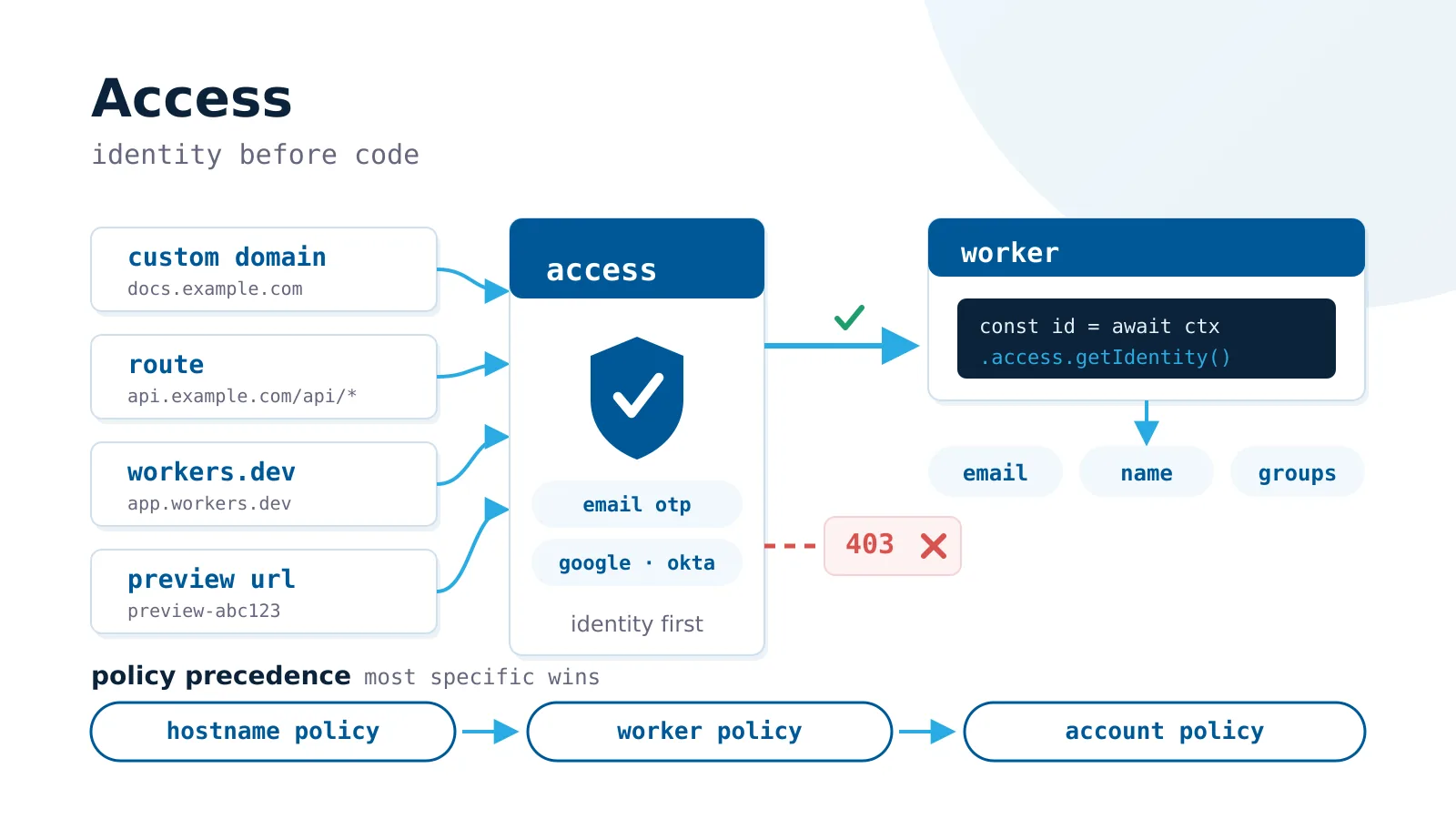
Cloudflare Access authenticating requests before Worker execution

On August 14, 2026, Cloudflare announced a useful change to the security model of Workers: Cloudflare Access can now be attached directly to a Worker, rather than only to each hostname in front of it.

This sounds like a small dashboard improvement, but it removes a common configuration gap. A Worker may be reachable through a Custom Domain, a route, its workers.dev address, and preview URLs. Previously, protecting one hostname did not automatically protect the others. Adding a domain without adding the matching Access application could unintentionally create a public path to an internal service.

With a Worker-level policy, Cloudflare checks the identity before the request reaches Worker code, regardless of which supported address the request used.

What changed

Access can now protect:

  1. preview deployments for one Worker;
  2. production and preview traffic for one Worker;
  3. previews for every Worker in an account;
  4. production and preview traffic for every current and future Worker in an account.

The account-wide option is particularly important for organizations in which many teams or AI coding tools can deploy applications. Instead of asking every developer to remember an extra security step, the infrastructure team can make privacy the default. A deliberately public Worker can have an explicit exception.

The older hostname and path-based Access applications remain available. They are still the right tool when only admin.example.com, a particular route, or one part of an otherwise public application should require authentication.

Policy precedence matters

Cloudflare evaluates applicable Access configurations from the most specific to the broadest:

  1. hostname or path policy;
  2. Worker-level policy;
  3. account-level Worker policy.

This means an account-wide rule is a safety net, not necessarily the final decision. A more specific policy can change the result for one Worker or hostname. Removing a specific rule may reveal a broader rule underneath rather than make the application public.

Teams should record intentional exceptions in Infrastructure as Code or an access register. Otherwise, a bypass created for a temporary test can quietly become permanent.

Enabling Access for one Worker

The shortest dashboard path is:

  1. Enable Cloudflare Zero Trust for the account.
  2. Open Workers & Pages and select the Worker.
  3. Open the Access tab.
  4. Select Protect this Worker behind Access.
  5. Choose Previews only or All traffic.
  6. Select who may sign in and apply the policy.

The initial policy can allow Cloudflare account members or a verified email domain. More advanced rules, including identity providers, groups, device posture, and service tokens, are managed in Zero Trust.

Cloudflare also exposes the new destination types through the Access Applications API. For example, an application with a worker destination protects production and previews for that Worker:

{
  "type": "self_hosted",
  "name": "Access for internal-dashboard",
  "destinations": [
    {
      "type": "worker",
      "worker_id": "<WORKER_ID>"
    }
  ]
}

Use preview_worker to protect only one Worker’s previews, all_preview_workers for all account previews, or all_workers for all Worker traffic. A complete API request also needs an Access policy. Do not copy a partial example into production without defining who is allowed.

Identity is available in Worker code

For a request authenticated directly by Access, the Worker can read the user identity from ctx.access. There is no need to parse and verify the Access JWT just to obtain basic claims:

export default {
  async fetch(request, env, ctx) {
    if (!ctx.access) {
      return new Response("Access required", { status: 403 });
    }

    const identity = await ctx.access.getIdentity();
    const email = identity?.email ?? "unknown";

    return Response.json({ email });
  }
};

This is useful for personalization, audit events, and application-level authorization. Access authenticates the caller, but application code must still decide whether that authenticated person may read a particular customer, document, or administrative action.

Wrangler can simulate the identity during local development:

{
  "access": {
    "dev": {
      "aud": "internal-dashboard",
      "identity": {
        "email": "developer@example.com",
        "groups": ["engineering"]
      }
    }
  }
}

Changing the simulated user makes role tests faster, but it does not test the production identity provider or the deployed Access policy. Those still need an integration test after deployment.

Important limitations

Worker-level Access is not a universal replacement for hostname-based policies.

WebSockets are not supported by Worker-level policies. An upgrade request receives 403. Workers using WebSockets, including real-time Durable Object applications, should continue to use a hostname-based Access application.

ctx.access does not cross Service Bindings or RPC. A downstream Worker does not automatically receive the caller’s Access context. Pass only the authorization data the downstream service needs, using a design that does not let an untrusted caller forge it, or make a newly authenticated request to an Access-protected hostname.

Static Assets have an identity caveat. Access protects the application and its files, but the internal router used by Workers Static Assets does not pass ctx.access to the user Worker. Test frameworks that generate an assets configuration even if it is absent from the source file.

Preview URLs have their own platform limits. They are not currently generated for Workers implementing Durable Objects, including Containers and Sandbox Workers. Access cannot protect a preview URL that the platform does not create.

Machine-to-machine access

Internal APIs and CI jobs should not imitate a login. Cloudflare Access service tokens provide a Client ID and Client Secret that automated clients send in request headers:

curl \
  -H "CF-Access-Client-Id: $CF_ACCESS_CLIENT_ID" \
  -H "CF-Access-Client-Secret: $CF_ACCESS_CLIENT_SECRET" \
  https://internal-api.example.com/health

Configure the Access policy with the Service Auth action, store the secret in a secret manager, set an expiration alert, and rotate it. Revoking an Access session is not the same as revoking a service token; delete or disable the credential when access must stop.

A practical rollout plan

For an account that already runs several Workers, we recommend:

  1. Inventory Custom Domains, routes, workers.dev, and enabled preview URLs.
  2. Identify public applications, internal applications, and mixed public/private paths.
  3. Start with account-wide protection for previews.
  4. Apply Worker-level protection to internal HTTP applications.
  5. Keep hostname policies for WebSockets and mixed-access applications.
  6. Add explicit, reviewed bypasses only for intentionally public Workers.
  7. Test human login, denied users, service tokens, preview URLs, and every production hostname.
  8. Verify what reaches logs and what identity data is available across service boundaries.

The key improvement is not a new login screen. It is a safer unit of policy. Attaching identity enforcement to the workload closes the gap between deploying a Worker and remembering every address through which it can be reached.

Sources