Firewall Architecture for a HomeLab: Simplicity as a Security Feature
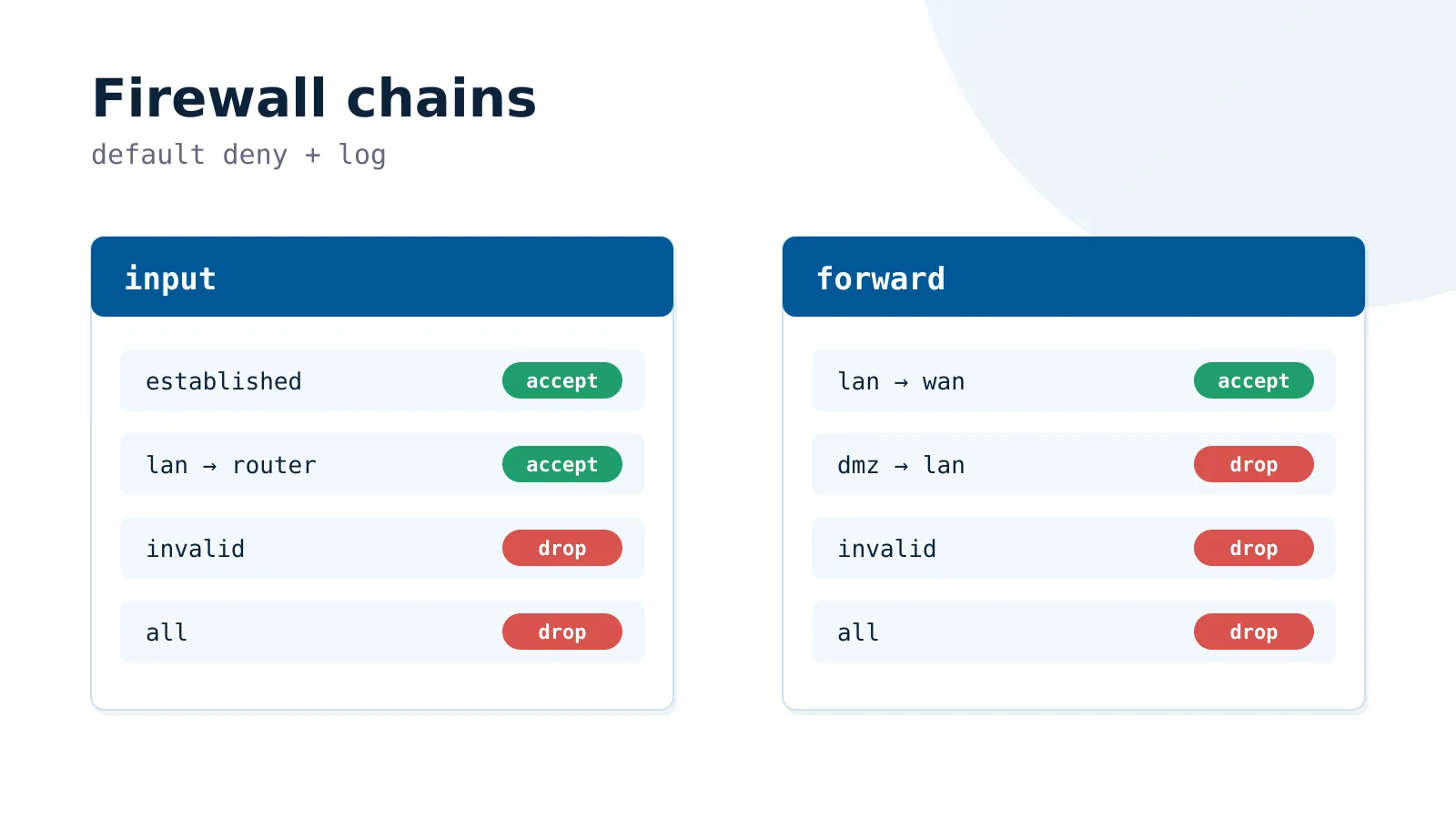
A homelab firewall fails for a boring reason: nobody can read it six months later. This is the MikroTik ruleset we keep, built so that every rule states its intent and the default is deny. It assumes a router you can lock yourself out of, so it starts with safe mode.
Before You Touch Anything: Safe Mode
- Before editing any firewall, NAT, or routing rule on a remote or headless router, enable Safe Mode. A single bad rule can lock you out completely — and a home router is rarely sitting next to you with a console cable ready.
- In Safe Mode, if your session drops (because you just locked yourself out), the router automatically reverts every change made during that session. You get back in as if nothing happened.
- In the terminal, toggle it with
Ctrl+X. The prompt changes to show<SAFE>. Make your changes, confirm connectivity still works, then pressCtrl+Xagain to commit. In WinBox, use theSafe Modebutton in the top-left. - Treat this as non-negotiable for firewall work. It costs two keystrokes and saves a physical trip to the router — or frustrations about lost few hours or days of time.
The Core Principle: Keep It Readable
- The single most important rule of a home firewall is that
youhave to understand it six months from now. A ruleset you can no longer reason about is not a secure ruleset — it is a liability. - Every rule you add is a rule you must remember, audit, and account for when something breaks at 11pm. Complexity has a maintenance cost that compounds silently.
- Prefer fewer, broader, well-named rules over many narrow ones. A firewall with twelve rules you fully understand beats one with forty rules you half-remember.
- This is an explicit trade-off. You
couldlayer on per-application DNS filtering via AdGuard, deep IDS inspection, granular per-device ACLs, and dozens of micro-rules. Sometimes the right call is tonotadd that rule — the marginal security gain does not justify the drop in maintainability. - Security and maintainability are not opposites, but past a certain point they pull against each other. The art is knowing where that point is for a home network you maintain alone.
Use Interface Lists, Not Interface Names
- Group interfaces by trust level into lists rather than referencing physical ports directly. This keeps rules stable when hardware or VLANs change, and makes intent obvious at a glance.
- A typical set:
WANfor the uplink,LANfor the bridge,TRUSTEDfor management-capable networks (your main user VLAN, the VPN, a rescue port), andWAN_ONLYfor segments that may reach the internet but never the rest of the LAN.
/interface list
add name=WAN
add name=LAN
add name=TRUSTED
add name=WAN_ONLY

/interface list member
add interface=ether1 list=WAN
add interface=vlan1_users list=TRUSTED
add interface=vpn list=TRUSTED
add interface=ether5 list=TRUSTED comment="Rescue port"
add interface=vlan3_iot list=WAN_ONLY
add interface=vlan5_dmz list=WAN_ONLY- Now a rule reads as
in-interface-list=TRUSTEDinstead of an opaque list of port names. When you add a new trusted VLAN later, you add one list member — not a new firewall rule.
Default Deny, With Logging
- Both the
inputchain (traffic to the router itself) and theforwardchain (traffic passing through) should end in an explicit drop. Everything not previously accepted is rejected. - Log the final drop. When something legitimate stops working, the log tells you exactly what got blocked — this is what makes a deny-by-default policy debuggable instead of mysterious.
/ip firewall filter
add action=drop chain=input  comment="Final drop - protect router" log=yes log-prefix=DROP_
add action=drop chain=forward comment="Final drop - block unauthorized" log=yes log-prefix=DROP_
The Input Chain: Protecting the Router Itself
- Order matters. Accept the cheap, common cases first (established connections), then handle the exceptions, then drop everything else.
- Accept
established,related,untrackedat the very top — the vast majority of packets match here, so it keeps the rest of the chain off the hot path. - Drop
invalidearly. These are packets in a nonsensical connection state and have no legitimate purpose. - From the WAN, allow only what you truly expose: a ping for diagnostics (scoped to echo-request only, not all of ICMP), and your VPN listen port.
- Allow full management access only from
TRUSTED. This single rule replaces a dozen per-service exceptions.
/ip firewall filter
add action=accept chain=input connection-state=established,related,untracked \
    comment="Accept established & related"
add action=drop   chain=input connection-state=invalid \
    comment="Drop invalid" log-prefix=invalid_
add action=accept chain=input protocol=icmp icmp-options=8:0 in-interface-list=WAN \
    comment="Allow ping from WAN only"
add action=accept chain=input protocol=udp dst-port=22001 in-interface-list=WAN \
    comment="WireGuard listen port"
add action=accept chain=input in-interface-list=TRUSTED \
    comment="Management access from trusted networks"
# ... final drop goes here- Notice what is
nothere: no separate rule for SSH, for Winbox, for the web UI, for DNS. They are all covered by the singleTRUSTEDaccept. Fewer rules, same security, far easier to read.
The Forward Chain: Controlling What Passes Through
- FastTrack established connections first for performance, then accept established/related as the slow-path fallback, then drop invalid.
- Let
TRUSTEDreach both the WAN and the LAN freely — these are your devices. - Let
WAN_ONLYsegments (IoT, DMZ) reach the internet but explicitly bind them to the uplink interface so they cannot pivot into the LAN. - Allow port-forwarded traffic via
connection-nat-state=dstnat, then drop the rest.
/ip firewall filter
add action=fasttrack-connection chain=forward connection-state=established,related \
    comment="FastTrack"
add action=accept chain=forward connection-state=established,related,untracked \
    comment="Accept established & related"
add action=drop   chain=forward connection-state=invalid comment="Drop invalid"
add action=accept chain=forward in-interface-list=TRUSTED \
    comment="Trusted -> WAN/LAN"
add action=accept chain=forward in-interface-list=WAN_ONLY out-interface=ether1 \
    comment="Isolated segments -> internet only"
add action=accept chain=forward connection-nat-state=dstnat \
    comment="Allow port forwarding"
# ... final drop goes here
Context: VLAN Segmentation
- The firewall is only as good as the topology beneath it. Splitting the network into VLANs — trusted users, IoT, a public-facing DMZ — turns broad firewall intentions into enforceable boundaries.
- Trusted devices live in one VLAN inside
TRUSTED. Untrusted gear (smart-home devices, cameras, anything you cannot patch) lives in aWAN_ONLYVLAN with client isolation, so a compromised device cannot reach the rest of the network. - A public-facing service goes in its own DMZ VLAN, also
WAN_ONLY. If that host is breached, the blast radius stops at the DMZ. - This is what lets the forward chain stay short: trust decisions are encoded in the segment a device belongs to, not in dozens of address-specific rules.
Context: Sitting Behind Cloudflare
- If you host a website through Cloudflare, you can ensure no one reaches your origin directly by IP — all inbound web traffic must arrive from Cloudflare’s network.
- Maintain an address list of Cloudflare’s published ranges and drop any WAN traffic to ports 80/443 whose source is not on that list. One rule enforces the entire policy.
- Keep the list current automatically with a scheduled script that fetches the official range list, rather than maintaining it by hand.
/ip firewall filter
add action=drop chain=forward protocol=tcp dst-port=80,443 in-interface-list=WAN \
    src-address-list=!cloudflare-ipv4 log=yes log-prefix=CF_PROTECT \
comment="Block non-Cloudflare traffic to origin"- This pairs naturally with a DMZ: the destination NAT sends 80/443 to the web host in the public segment, and the Cloudflare rule guarantees the only path to it runs through Cloudflare’s proxy.
What to Leave Out
- Resist the urge to log every drop in production — log the final drops and genuinely interesting events, not every blocked broadcast, or your logs become noise you stop reading.
- Do not write a rule for a threat your topology already prevents. If a segment is
WAN_ONLY, you rarely need extra per-device rules to keep it off the LAN — the segment already does that. - Every rule should answer a question you can state in one sentence. If you cannot, the rule probably should not exist.
Summary
- Default deny on both
inputandforward, with logged final drops. - Group interfaces into trust-based lists; write rules against the lists.
- Accept established traffic first, drop invalid early, expose the minimum from WAN, grant management only to
TRUSTED. - Encode trust in VLAN segmentation so the firewall rules can stay short.
- Behind Cloudflare, enforce origin protection with a single source-list rule kept fresh by a script.
- Above all: a firewall you fully understand is more secure than a clever one you do not. Choose maintainability deliberately.