Creating Cloudflare Account Tokens for CI, VM and Admin
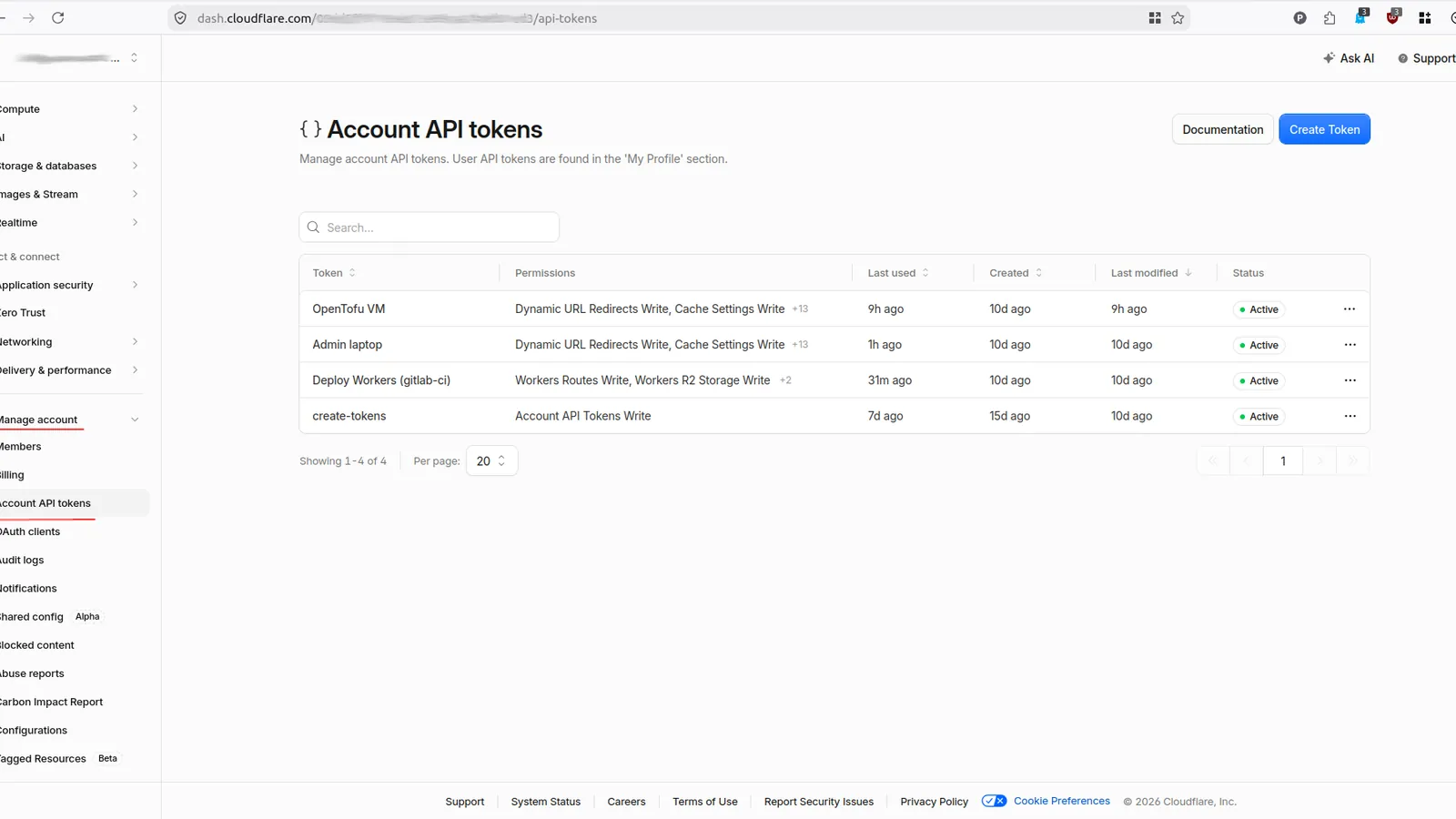
One shared CF token for a VM, CI/CD and an admin is easy at the start, but it quickly becomes a frustrating and unstable setup. Creating tokens through the UI gets annoying just as fast.
The fix is matching the token type to the resource and creating it in IaC, with help from AI agents. A “USER” token looks like the quick way out. It pays off more to invest once, create an account token for OpenTofu, and use it to generate dedicated tokens per service: CI/CD, VM, admin.
Cloudflare account-owned API tokens solve the ownership problem. They are service principals owned by the account, not by the employee who created them. For durable automation, create one token per workload:
| Identity | Purpose | Typical scope |
|---|---|---|
| VM | OpenTofu managing Cloudflare infrastructure | Permissions required by the declared account and zone resources |
| CI/CD | Wrangler deploying Workers | Workers Scripts and only the related capabilities the pipeline uses |
| Admin laptop | Controlled local administration | Explicit administrative account and zone permissions |
Bootstrap correctly
Creating account-owned tokens requires a Super Administrator on the target account. API-based creation requires a parent credential with Account API Tokens Write, or the Super Administrator’s Global API Key for initial bootstrap. You create that one parent token in the dashboard; OpenTofu handles the rest.
User API Tokens Write is not sufficient. It manages tokens owned by a user through a different API.
Authenticate the provider through the environment, never through committed HCL:
export CLOUDFLARE_API_TOKEN='parent-token-with-account-api-tokens-write'For Global API Key authentication, unset CLOUDFLARE_API_TOKEN and export CLOUDFLARE_EMAIL plus CLOUDFLARE_API_KEY.
Use the account-token resource
Provider v5 has two similarly named resources:
cloudflare_api_tokencreates a user-owned token, commonly prefixedcfut_;cloudflare_account_tokencreates an account-owned token, commonly prefixedcfat_.
The prefix is the fastest way to tell what a variable holds:
| Credential | Format | When to use |
|---|---|---|
| Global API Key | cfk_ + 40 characters + checksum |
first bootstrap only |
| User API token | cfut_ + 40 characters + checksum |
personal scripts |
| Account API token | cfat_ + 40 characters + checksum |
VM, CI/CD, admin |
Tokens created before 2026 have no prefix and still work. New values are scannable, so GitHub can spot a leak and report it to Cloudflare. The token formats page has the details.
Their permission-group GUIDs differ. For example, a Workers Scripts GUID copied from a user-token example is not necessarily accepted by the account-token API. Resolve current groups by exact name and scope:
data "cloudflare_account_api_token_permission_groups_list" "available" {
  account_id = var.account_id
  max_items  = 1000
}

locals {
  wanted = {
    workers_scripts = {
      name  = "Workers Scripts Write"
      scope = "com.cloudflare.api.account"
    }
    workers_routes = {
      name  = "Workers Routes Write"
      scope = "com.cloudflare.api.account.zone"
    }
  }

  permission_ids = {
    for key, wanted in local.wanted : key => one([
      for available in data.cloudflare_account_api_token_permission_groups_list.available.result : available.id
      if available.name == wanted.name && contains(available.scopes, wanted.scope)
    ])
  }
}
Matching the scope matters because Cloudflare has account-level and zone-level groups with related names.
Keep account and zone policies separate
The following shortened example creates a CI token. VM and laptop tokens use the same resource pattern with broader, explicit permission lists.
resource "cloudflare_account_token" "cicd" {
  account_id = var.account_id
  name       = "Deploy Workers (gitlab-ci)"

  policies = [{
    effect = "allow"
    permission_groups = [{
      id = local.permission_ids.workers_scripts
    }]
    resources = jsonencode({
      "com.cloudflare.api.account.${var.account_id}" = "*"
    })
    }, {
    effect = "allow"
    permission_groups = [{
      id = local.permission_ids.workers_routes
    }]
    resources = jsonencode({
      "com.cloudflare.api.account.${var.account_id}" = {
        "com.cloudflare.api.account.zone.*" = "*"
      }
    })
  }]
}
Account-owned tokens require this nested zone shape. A top-level com.cloudflare.api.account.zone.* wildcard is accepted in some user-token examples but is rejected by the account-token API.
Do not grant DNS, R2, Access or token-management rights to CI unless its commands actually need them. Build the VM and laptop lists from resources managed by their OpenTofu roots, not from an “all permissions” template.
Rotation on each apply
A built-in terraform_data resource can trigger replacement without adding a time or random provider:
resource "terraform_data" "rotation" {
  triggers_replace = timestamp()
}

resource "cloudflare_account_token" "cicd" {
  # account_id, name and policies omitted

  lifecycle {
    create_before_destroy = true
    replace_triggered_by  = [terraform_data.rotation]
  }
}
Every apply creates a replacement before revoking the previous token. This is simple, but distribution must happen immediately: update consumers with the new values before another apply. For less frequent rotation, replace timestamp() with an explicitly incremented rotation version.
GitLab shared runners should not receive an IP condition because their egress addresses change. A VM or laptop can be restricted when it consistently exits through a static address or VPN CIDR.
How to read the token after apply
The token value is only visible through an output, and every output is marked sensitive:
output "cicd_token" {
  value     = cloudflare_account_token.this["cicd"].value
  sensitive = true
}
So plain tofu output prints <sensitive>. The -raw flag returns the value:
tofu init && tofu apply
tofu output -raw cicd_token
The module exposes three names: cicd_token, vm_token and laptop_token.
Store the CI value as the masked and protected CLOUDFLARE_API_TOKEN variable. Put VM and laptop values in their own secret stores. sensitive = true only hides CLI rendering — the secrets still sit in state. Protect and preserve the state so later applies can revoke previous tokens.