Handling state in Azure Functions without Durable Functions
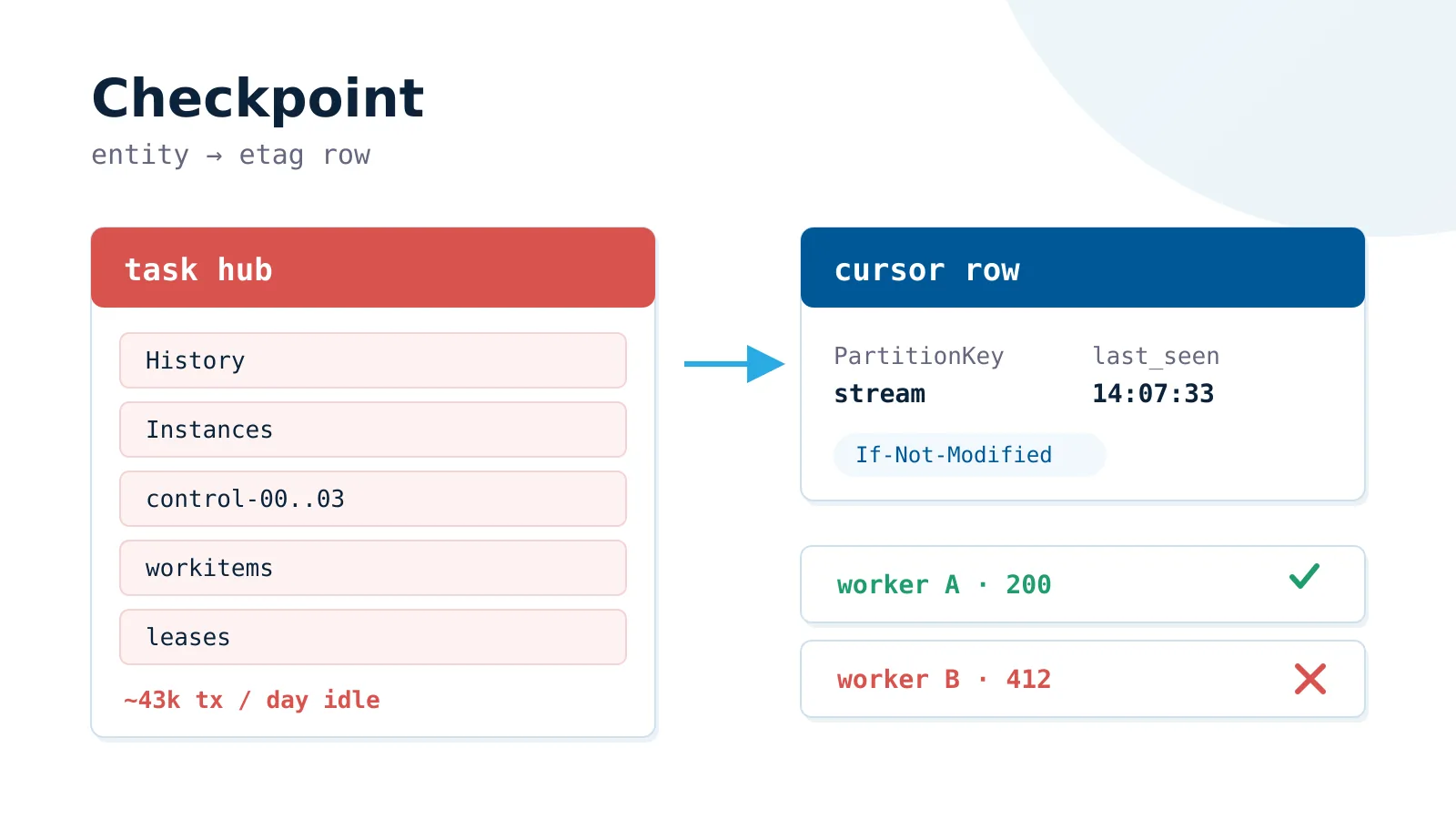
Durable Functions is a workflow engine and the default answer when a function must hold state. However, it is a generic solution built for the broad needs of Azure customers, which increases its complexity. Azure developers also deliver it, which leads to more frequent stability problems.
When your state is a cursor, a flag, or a counter, the simpler options below may be a better choice.
What the extension really costs
Creating a task hub on the Azure Storage provider adds two tables, five or more queues, and three blob containers to your account.
The bill continues after that:
- Idle polling. The scale controller reads every control queue every 10 seconds. With the default 4 partitions that is roughly 43,000 storage transactions a day, before your code runs once.
- A ceiling per key. Microsoft targets 64 entity operations per second. Plenty for a checkpoint, a wall for anything busier.
- Python gaps. Entities cannot signal other entities, and critical sections are missing entirely.
- Silent failures.
signal_entityis one way. The caller never sees a result or an exception. - Slow local work. Every run needs an emulator and a healthy task hub.
Name the state, then pick the store
| State | Example | Use |
|---|---|---|
| None | Read a blob, write a blob | Nothing |
| Cursor | Last processed timestamp | Table Storage row |
| Duplicate guard | “ID abc is done” | Table or Cosmos with TTL |
| Exclusive access | One writer per partition | Blob lease |
| Ordered per key | Every event for customer 42 | Service Bus sessions |
| Long wait | Approval that takes three days | Durable Functions |
The checkpoint row
A conditional write gives you the safety an entity used to give you:
table.update_entity(
    {"PartitionKey": stream, "RowKey": "cursor", "last_seen": value},
    mode=UpdateMode.REPLACE,
    etag=etag,
    match_condition=MatchConditions.IfNotModified,
)
When another worker moves the row first, the service returns HTTP 412 and the SDK raises ResourceModifiedError. That one check replaces the entity’s serialized writes. Read the row again and decide.
Three rules keep it correct
- Do the work first, save the cursor last. A crash then repeats the window instead of dropping it.
- Make every write idempotent.
upload_blob(overwrite=False)on a deterministic name is a complete guard. - Drop stale messages. Compare a sequence number, because queues deliver out of order.
When to keep Durable Functions
Keep the engine when the workflow itself is the problem:
- A step waits longer than the function timeout, such as a three-day approval.
- You fan out to 500 shards and need real error handling on the way back.
- Work in flight must survive a deployment.
- The orchestration already runs and earns its keep.
If you keep it, move to the Durable Task Scheduler. It drops the storage account and the polling bill, and existing apps migrate without code changes.
Name your state precisely. When the name is “the last thing I processed”, write it to a row with an ETag and delete the engine.