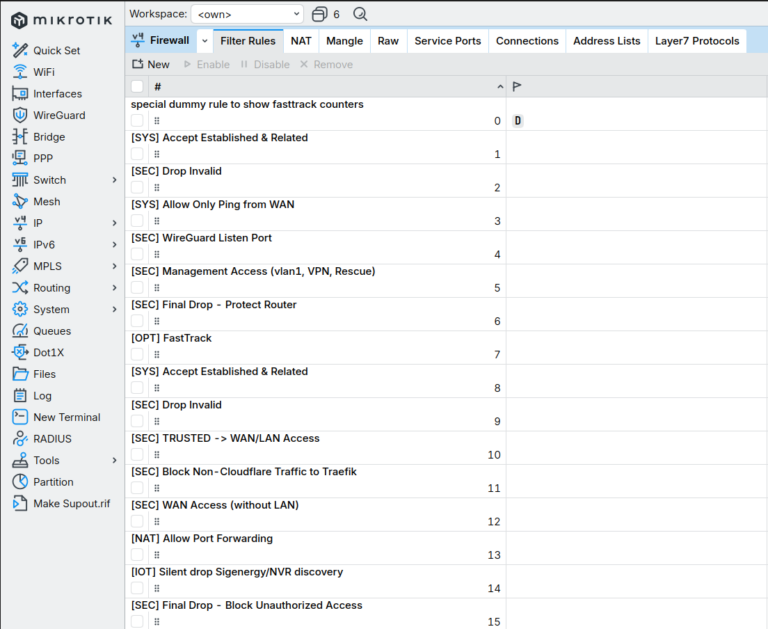
Before You Touch Anything: Safe Mode
- Before editing any firewall, NAT, or routing rule on a remote or headless router, enable Safe Mode. A single bad rule can lock you out completely — and a home router is rarely sitting next to you with a console cable ready.
- In Safe Mode, if your session drops (because you just locked yourself out), the router automatically reverts every change made during that session. You get back in as if nothing happened.
- In the terminal, toggle it with
Ctrl+X. The prompt changes to show <SAFE>. Make your changes, confirm connectivity still works, then press Ctrl+X again to commit. In WinBox, use the Safe Mode button in the top-left.
- Treat this as non-negotiable for firewall work. It costs two keystrokes and saves a physical trip to the router — or frustrations about lost few hours or days of time.
The Core Principle: Keep It Readable
- The single most important rule of a home firewall is that
you have to understand it six months from now. A ruleset you can no longer reason about is not a secure ruleset — it is a liability.
- Every rule you add is a rule you must remember, audit, and account for when something breaks at 11pm. Complexity has a maintenance cost that compounds silently.
- Prefer fewer, broader, well-named rules over many narrow ones. A firewall with twelve rules you fully understand beats one with forty rules you half-remember.
- This is an explicit trade-off. You
could layer on per-application DNS filtering via AdGuard, deep IDS inspection, granular per-device ACLs, and dozens of micro-rules. Sometimes the right call is to not add that rule — the marginal security gain does not justify the drop in maintainability.
- Security and maintainability are not opposites, but past a certain point they pull against each other. The art is knowing where that point is for a home network you maintain alone.
Use Interface Lists, Not Interface Names
- Group interfaces by trust level into lists rather than referencing physical ports directly. This keeps rules stable when hardware or VLANs change, and makes intent obvious at a glance.
- A typical set:
WAN for the uplink, LAN for the bridge, TRUSTED for management-capable networks (your main user VLAN, the VPN, a rescue port), and WAN_ONLY for segments that may reach the internet but never the rest of the LAN.
/interface list
add name=WAN
add name=LAN
add name=TRUSTED
add name=WAN_ONLY

/interface list member
add interface=ether1 list=WAN
add interface=vlan1_users list=TRUSTED
add interface=vpn list=TRUSTED
add interface=ether5 list=TRUSTED comment="Rescue port"
add interface=vlan3_iot list=WAN_ONLY
add interface=vlan5_dmz list=WAN_ONLY
- Now a rule reads as
in-interface-list=TRUSTED instead of an opaque list of port names. When you add a new trusted VLAN later, you add one list member — not a new firewall rule.
Default Deny, With Logging
- Both the
input chain (traffic to the router itself) and the forward chain (traffic passing through) should end in an explicit drop. Everything not previously accepted is rejected.
- Log the final drop. When something legitimate stops working, the log tells you exactly what got blocked — this is what makes a deny-by-default policy debuggable instead of mysterious.
/ip firewall filter
add action=drop chain=input  comment="Final drop - protect router" log=yes log-prefix=DROP_
add action=drop chain=forward comment="Final drop - block unauthorized" log=yes log-prefix=DROP_
The Input Chain: Protecting the Router Itself
- Order matters. Accept the cheap, common cases first (established connections), then handle the exceptions, then drop everything else.
- Accept
established,related,untracked at the very top — the vast majority of packets match here, so it keeps the rest of the chain off the hot path.
- Drop
invalid early. These are packets in a nonsensical connection state and have no legitimate purpose.
- From the WAN, allow only what you truly expose: a ping for diagnostics (scoped to echo-request only, not all of ICMP), and your VPN listen port.
- Allow full management access only from
TRUSTED. This single rule replaces a dozen per-service exceptions.
/ip firewall filter
add action=accept chain=input connection-state=established,related,untracked \
    comment="Accept established & related"
add action=drop   chain=input connection-state=invalid \
    comment="Drop invalid" log-prefix=invalid_
add action=accept chain=input protocol=icmp icmp-options=8:0 in-interface-list=WAN \
    comment="Allow ping from WAN only"
add action=accept chain=input protocol=udp dst-port=22001 in-interface-list=WAN \
    comment="WireGuard listen port"
add action=accept chain=input in-interface-list=TRUSTED \
    comment="Management access from trusted networks"
# ... final drop goes here
- Notice what is
not here: no separate rule for SSH, for Winbox, for the web UI, for DNS. They are all covered by the single TRUSTED accept. Fewer rules, same security, far easier to read.
The Forward Chain: Controlling What Passes Through
- FastTrack established connections first for performance, then accept established/related as the slow-path fallback, then drop invalid.
- Let
TRUSTED reach both the WAN and the LAN freely — these are your devices.
- Let
WAN_ONLY segments (IoT, DMZ) reach the internet but explicitly bind them to the uplink interface so they cannot pivot into the LAN.
- Allow port-forwarded traffic via
connection-nat-state=dstnat, then drop the rest.
/ip firewall filter
add action=fasttrack-connection chain=forward connection-state=established,related \
    comment="FastTrack"
add action=accept chain=forward connection-state=established,related,untracked \
    comment="Accept established & related"
add action=drop   chain=forward connection-state=invalid comment="Drop invalid"
add action=accept chain=forward in-interface-list=TRUSTED \
    comment="Trusted -> WAN/LAN"
add action=accept chain=forward in-interface-list=WAN_ONLY out-interface=ether1 \
    comment="Isolated segments -> internet only"
add action=accept chain=forward connection-nat-state=dstnat \
    comment="Allow port forwarding"
# ... final drop goes here
Context: VLAN Segmentation
- The firewall is only as good as the topology beneath it. Splitting the network into VLANs — trusted users, IoT, a public-facing DMZ — turns broad firewall intentions into enforceable boundaries.
- Trusted devices live in one VLAN inside
TRUSTED. Untrusted gear (smart-home devices, cameras, anything you cannot patch) lives in a WAN_ONLY VLAN with client isolation, so a compromised device cannot reach the rest of the network.
- A public-facing service goes in its own DMZ VLAN, also
WAN_ONLY. If that host is breached, the blast radius stops at the DMZ.
- This is what lets the forward chain stay short: trust decisions are encoded in the segment a device belongs to, not in dozens of address-specific rules.
Context: Sitting Behind Cloudflare
- If you host a website through Cloudflare, you can ensure no one reaches your origin directly by IP — all inbound web traffic must arrive from Cloudflare’s network.
- Maintain an address list of Cloudflare’s published ranges and drop any WAN traffic to ports 80/443 whose source is not on that list. One rule enforces the entire policy.
- Keep the list current automatically with a scheduled script that fetches the official range list, rather than maintaining it by hand.
/ip firewall filter
add action=drop chain=forward protocol=tcp dst-port=80,443 in-interface-list=WAN \
    src-address-list=!cloudflare-ipv4 log=yes log-prefix=CF_PROTECT \
    comment="Block non-Cloudflare traffic to origin"
- This pairs naturally with a DMZ: the destination NAT sends 80/443 to the web host in the public segment, and the Cloudflare rule guarantees the only path to it runs through Cloudflare’s proxy.
What to Leave Out
- Resist the urge to log every drop in production — log the final drops and genuinely interesting events, not every blocked broadcast, or your logs become noise you stop reading.
- Do not write a rule for a threat your topology already prevents. If a segment is
WAN_ONLY, you rarely need extra per-device rules to keep it off the LAN — the segment already does that.
- Every rule should answer a question you can state in one sentence. If you cannot, the rule probably should not exist.
Summary
- Default deny on both
input and forward, with logged final drops.
- Group interfaces into trust-based lists; write rules against the lists.
- Accept established traffic first, drop invalid early, expose the minimum from WAN, grant management only to
TRUSTED.
- Encode trust in VLAN segmentation so the firewall rules can stay short.
- Behind Cloudflare, enforce origin protection with a single source-list rule kept fresh by a script.
- Above all: a firewall you fully understand is more secure than a clever one you do not. Choose maintainability deliberately.